
“I am reading” is an easily configurable WordPress plugin to display the book you are currently reading in a sidebar widget or in your template. The book information is read from “Amazon Web Services” (AWS) and gets cached in the database.
For the second time already, “I am reading” has been abandoned by its author(s) and disappeared from the web and the WordPress repository. So, once again, I re-uploaded it under the name of “I am reading (continued)”. I’m not going to really develop the plugin, but I will at least try to keep it alive in its current state.
Download:
The latest version of the plugin is always available here.
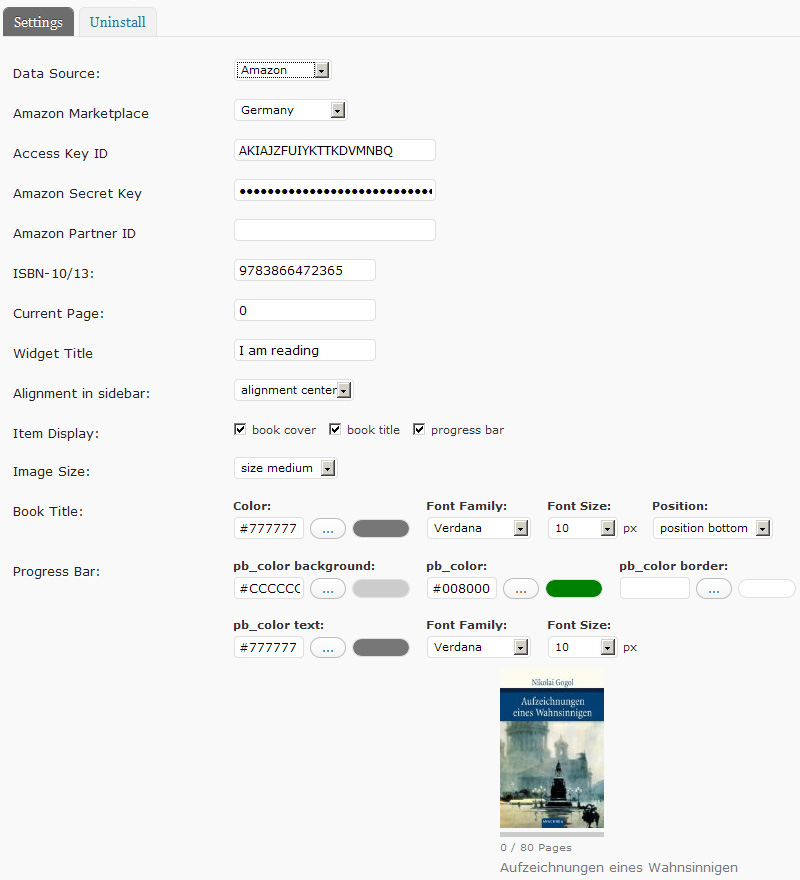
Some features:
- Search for your current read book by title and/or author
- Search for your current read book by ISBN
- Easy setup of fonts and colors with live preview
- Ready for Codestyling Localization plugin
Installation:
- Unzip into your
/wp-content/plugins/directory. If you’re uploading it manually, make sure to upload the top-level folder. Do not just upload all the PHP files and put them in/wp-content/plugins/. - Activate the plugin through the “Plugins” menu in WordPress.
- Type in your Amazon Access Key ID and Secret Access Key or register for free first.
Frequently Asked Questions:
- What are the Amazon Web Services, and do I have to pay for them?
You need to be a registered member of the Amazon Web Services to send search requests to Amazon. This is a 100% free service providing product information about books and more. You won’t have to pay for it. - Can I use the plugin without a sidebar widget?
Yes, you can. Just use the shortcode [i-am-reading] to display your current read book in posts, pages or wherever you like, or insert the following PHP code into your template:
if(function_exists('iar_print_html')) { iar_print_html(); }
11 responses to “I am reading (continued)”
Hi Rosa,
anscheinend hat Amazon da etwas an der API verändert. Ich werde versuchen, es zu reparieren, aber ich kann nicht genau sagen, wie lange ich dafür brauchen werde. Ich bin im Moment ein wenig beschäftigt mit Studieren usw. ;)
Hi Elysium,
Amazon must have changed something in their API. I will try to fix it, but I can’t say for sure how long it will take. I’m a little busy studying and stuff … ;)